






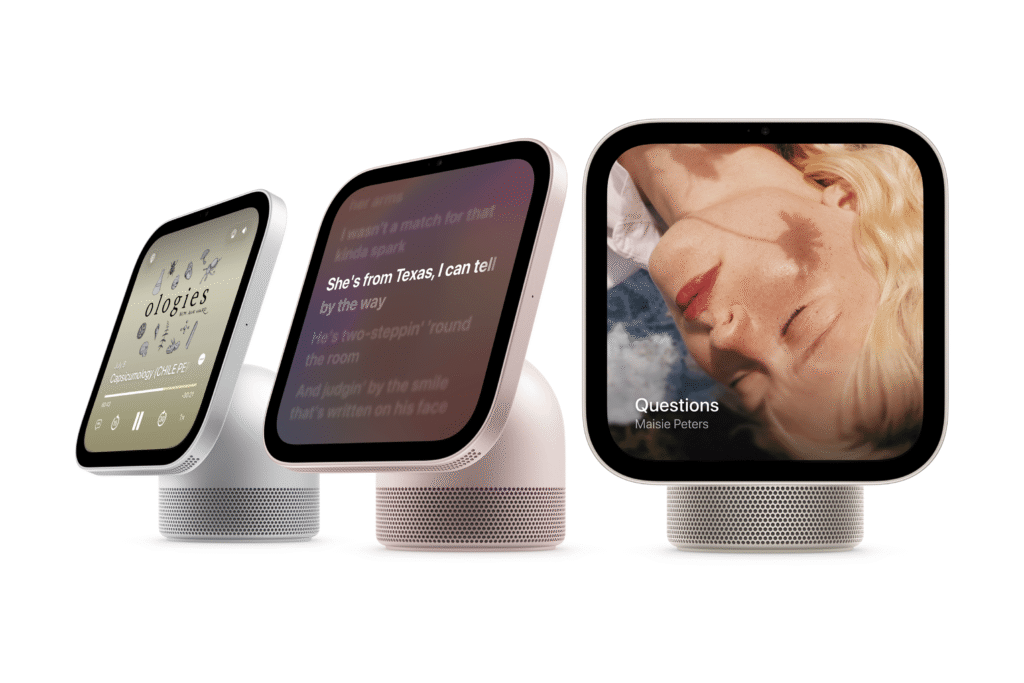
That is, if you’re comfortable placing a camera-equipped display in the bedroom. A 12-megapixel Center Stage camera and four-microphone array sit on the front, but they aren’t just for FaceTime calls. The camera handles facial recognition, allowing the software to adapt to whoever is looking at the screen. Apple says all of this data stays on device.
“Trust is becoming increasingly important with rising consumer expectations around privacy and security,” writes Anshika Jain, principal analyst at Counterpoint, in an email to WIRED. “In fact, Apple could actually benefit from its privacy-first approach.”
You can add up to six iCloud accounts, and the user interface will adapt to each person, like Google’s Pixel Tablet. That means your wife can tint every app icon green and have no widgets on her home screen, but if you stand in front of the HomeView, it’ll switch to your setup. You won’t be able to view other household members’ sensitive messages and personal information. For this personal content to show up, you don’t just have to stand in front of the HomeView—your iPhone needs to be on the same Wi-Fi network and must have been recently unlocked.
The HomeView can also recognize voices, which helps if Dad asks Siri AI to “Play music.” It will play from Dad’s music library and his preferred music app, rather than another iCloud user’s music. If you have multiple HomePods or HomeViews, you can manage your speaker groups in the HomeView’s interface.
The HomeView also supports Apple’s Handoff tech, so you can bring your iPhone close to send a Safari recipe to the smart display, or have it continue the podcast you were listening to on your commute. In the middle of a FaceTime or phone call? Put your iPhone near the HomeView, and it’ll transfer it over.
Like any smart display or smart speaker, Siri AI powers the HomeView. It is, after all, the main way to interact with the device (though yes, there’s a keyboard you can pull up to type). Apple spent a great deal of time revamping Siri this year, finally launching a more capable assistant in iOS 27.
Siri AI on the HomeView understands your personal context from your iPhone, so if you ask it to play a song your friend Eric recommended, it’ll know right away what you mean by looking at your Messages history. You can ask when your brother Jeff will likely arrive at your home from the airport on Thursday, then set a schedule for Siri to turn on the coffee maker 15 minutes before his estimated arrival. All of this can be done with natural language, meaning you don’t have to say specific commands for Siri AI to understand you.